C#怎么实现gh里的custom preview电池的功能

抱歉没有找到C#分区,就发到ghpy来了。
我自己写了一段代码,逻辑是随机生成50个平面的圆,他们直径分别为1、2、3mm。
目前有两个问题,
第一个问题是在C#里怎么在一个输出端里把三种直径的圆分别放在三个分支以树形数据一起输出。
第二个问题是怎么用类似gh的custom preview组件,分别对这三种圆进行上色预览。

using System;
using System.Collections.Generic;
using Rhino.Geometry;

public class Script_Instance : GH_ScriptInstance
{
    private void RunScript(object input, ref object Circles1mm, ref object Circles2mm, ref object Circles3mm)
    {
        Random random = new Random();
        
        List<Circle> list1mm = new List<Circle>();
        List<Circle> list2mm = new List<Circle>();
        List<Circle> list3mm = new List<Circle>();
        
        for (int i = 0; i < 50; i++)
        {
            double x = random.NextDouble() * 100;
            double y = random.NextDouble() * 100;
            Point3d center = new Point3d(x, y, 0);
            
            int diameterChoice = random.Next(1, 4);
            double radius = diameterChoice / 2.0;
            Circle circle = new Circle(center, radius);
            
            switch (diameterChoice)
            {
                case 1: list1mm.Add(circle); break;
                case 2: list2mm.Add(circle); break;
                case 3: list3mm.Add(circle); break;
            }
        }
        
        Circles1mm = list1mm;
        Circles2mm = list2mm;
        Circles3mm = list3mm;
    }
}
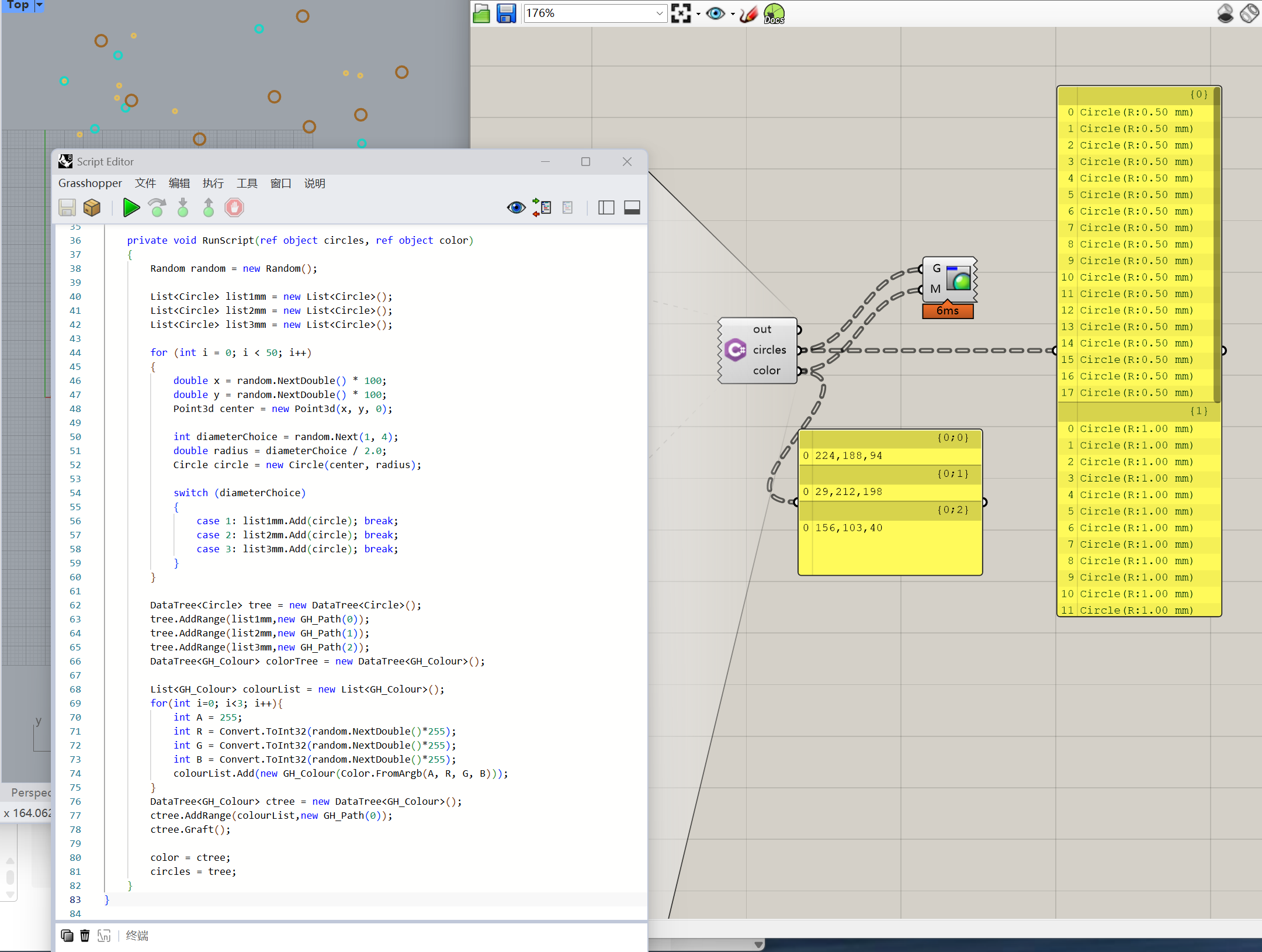
两个问题合并到一起,看代码和图示:

private void RunScript(ref object circles, ref object color)
    {
        Random random = new Random();
        
        List<Circle> list1mm = new List<Circle>();
        List<Circle> list2mm = new List<Circle>();
        List<Circle> list3mm = new List<Circle>();
        
        for (int i = 0; i < 50; i++)
        {
            double x = random.NextDouble() * 100;
            double y = random.NextDouble() * 100;
            Point3d center = new Point3d(x, y, 0);
            
            int diameterChoice = random.Next(1, 4);
            double radius = diameterChoice / 2.0;
            Circle circle = new Circle(center, radius);
            
            switch (diameterChoice)
            {
                case 1: list1mm.Add(circle); break;
                case 2: list2mm.Add(circle); break;
                case 3: list3mm.Add(circle); break;
            }
        }

        DataTree<Circle> tree = new DataTree<Circle>();
        tree.AddRange(list1mm,new GH_Path(0));
        tree.AddRange(list2mm,new GH_Path(1));
        tree.AddRange(list3mm,new GH_Path(2));
        DataTree<GH_Colour> colorTree = new DataTree<GH_Colour>();

        List<GH_Colour> colourList = new List<GH_Colour>();
        for(int i=0; i<3; i++){
            int A = 255;
            int R = Convert.ToInt32(random.NextDouble()*255);
            int G = Convert.ToInt32(random.NextDouble()*255);
            int B = Convert.ToInt32(random.NextDouble()*255);
            colourList.Add(new GH_Colour(Color.FromArgb(A, R, G, B)));
        }
        DataTree<GH_Colour> ctree = new DataTree<GH_Colour>();
        ctree.AddRange(colourList,new GH_Path(0));
        ctree.Graft();
        
        color = ctree;
        circles = tree;
    }

1 个赞

OK了,感谢J大,顺便问一下是不是这个display的组件不适合直接写在脚本里,需要另外接电池。